Use Your UTORid & TCard

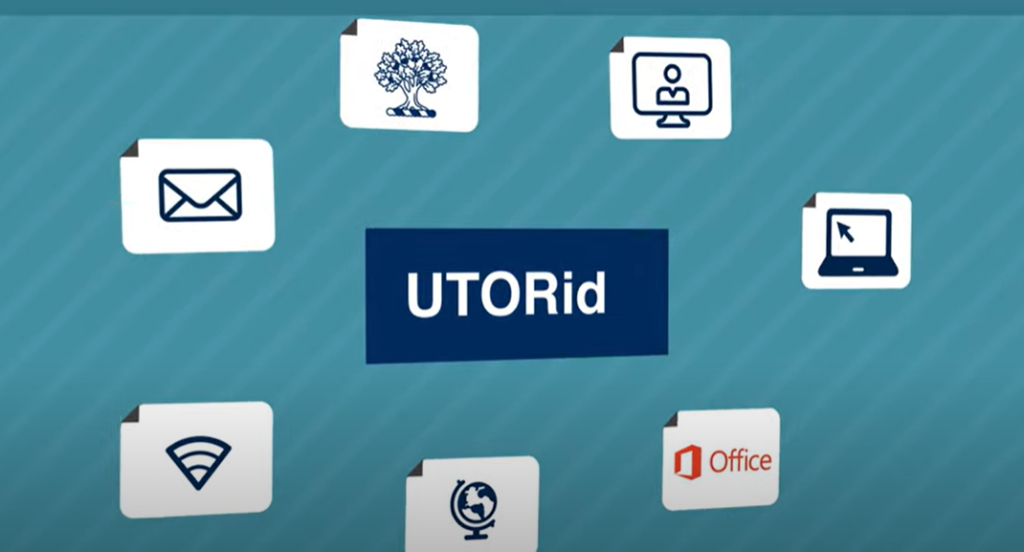
Use your UTORid for key U of T Services

  • ACORN
    Enrol in courses, check fees and finances, update personal information, and access academic support.
  • Quercus 
    Access your courses online, view materials, submit work, and see course updates. 
  • UTmail+ 
    Your official University of Toronto email address. 
  • Campus Wi-Fi 
    Secure internet access on all campuses. 
  • Library access 
    Online journals, articles, and databases. 
  • Microsoft 365 
    Free access to Word, Excel, PowerPoint, and Teams. 
Use your TCard for identification, access, and payments

Caring for your TCard and what to do if it isn’t working

If your TCard is damaged or stops working, get a replacement as soon as possible.

To protect your TCard:

  • Carry it in your wallet or another protective card holder. 
  • Keep it away from other cards and vinyl windows. 
  • Do not carry your TCard loosely in your pocket or bag unless it is in a protective case. 

Instructions to get your UTORid & TCard for other audiences

If you haven’t converted your JOINid to a UTORid, follow the process for newly admitted students.

If you need a replacement TCard, visit Replace your TCard.

If you’ve been absent from the University for two or more years, you’ll need to have a new photo taken and provide legal status documentation.

If, for disability-related reasons, you’ll have difficulty waiting or standing in a line-up, let TCard staff know when you arrive.

Name Resources

The University of Toronto has a way for students to have their first name changed on their academic records and ACORN. If you use a different name than the one indicated on your photo ID and legal status documentation, contact your registrar’s office and request the Change of Name or Gender Request Form.

For more information and detail on the name change process, please visit the Change of Name Guidelines – University Registrar’s Office.

To access Quercus, SCS students can use the “qqID” provided when you register for a SCS course.

To get a UTORid to access online library resources and campus WiFi:

  • Complete a TCard Permission Letter Request on or after the start date of your SCS course.
  • If approved, a letter including a UTORid will be emailed to you within two business days.

To get a TCard, visit our office during our operational hours and bring your:

  • TCard permission letter
  • Valid Government photo ID (original/unexpired/no photocopies)
    • Documents must match the information in U of T’s record system.

A TCard is not required for classes, if you wish to acquire one, there is a $20 issuance fee (debit or credit only).

If, for disability-related reasons, you’ll have difficulty waiting or standing in a line-up, let TCard staff know when you arrive.

Visit the SCS website for more information.

Name Resources

The University of Toronto has a simple single source application for School of Continuing Studies students to have their display name changed on certain university systems once they have acquired their UTORid. This can be done though https://my.auth.utoronto.ca/.

Students in eligible programs follow the process for newly admitted students. 

To determine if your program is eligible to pick up a TCard, visit the TST website

If you are not in one of the programs listed, contact your college registrar’s office

International Students must have their legal status verified by their college registrar PRIOR to picking up their TCard.

If, for disability-related reasons, you’ll have difficulty waiting or standing in a line-up, let TCard staff know when you arrive. 

Get your UTORid and SAK:

  • Your UTORid and Secret Activation Key (SAK) can be found on the online services letter provided to you by your business officer/the Division of People Strategy, Equity & Culture.
  • Contact your business officer if you have any difficulties/for more information.

Activate your UTORid:

To get your TCard:

If, for disability-related reasons, you’ll have difficulty waiting or standing in a line-up, let TCard staff know when you arrive.

Name Resources

The University of Toronto has simple ways for staff and faculty to have their name changed in HRIS (Human Resource Information System). For more information on this process, please visit the U of T Identification page on the Sexual & Gender Diversity Office website.

Get your UTORid and SAK:

  • Your UTORid and Secret Activation Key (SAK) can be found on the online services letter provided to you by the Division of People Strategy, Equity & Culture, or your department.
  • If you did not receive an online service letter, you may need a business officer from your U of T department to sponsor your access. Consult the Affiliated Researchers section of Library Membership Services online for more information.

Contact your department if you have any difficulties/for more information.

To activate your UTORid:

Users can also visit our office to get a TCard during our operational hours and bring your:

  • UTORid
  • Valid Government photo ID (original/unexpired/no photocopies).
    • Documents must match the information in U of T’s record system.

If, for disability-related reasons, you’ll have difficulty waiting or standing in a line-up, let TCard staff know when you arrive.

Name Resources

The University of Toronto has simple ways for staff and faculty to have their name changed in HRIS (Human Resource Information System). For more information on this process, please visit the U of T Identification page on the Sexual & Gender Diversity Office website.

Once you have pre-registered with the Postgraduate Medical Education Office and received login details for the Postgraduate Web Evaluation and Registration (POWER) system, log in to your POWER account to retrieve your UTORid and Secret Activation Key (SAK), which can be found at the top of your Initial View screen. Use this information to activate your UTORid through the UTORid Activation page.  If the SAK field is blank, it indicates that your UTORid has already been activated. Use the UTORid Check tool to verify your UTORid status.

If you have forgotten your UTORid, password or e-mail, please contact the University of Toronto Information Commons Help Desk.

If you encounter any issues accessing the POWER system, contact postgrad.med@utoronto.ca for assistance.

To get a TCard, visit our office during our operational hours and bring your:

  • UTORid/Trainee ID number
  • Valid Government photo ID (original/unexpired/no photocopies).
    • Documents must match the information in U of T’s record system.

If, for disability-related reasons, you’ll have difficulty waiting or standing in a line-up, let TCard staff know when you arrive.

Name Resources

To update your name with the PGME office, please ensure that the change has been legally completed first. Once legally updated, your first and last name must align with your CPSO (College of Physicians and Surgeons of Ontario) licensure.
For name resources, please visit the U of T Identification page on the Sexual & Gender Diversity Office website.

Including contractors, temporary staff/faculty and visiting professors

Guest UTORid accounts provide University visitors, including contractors, temporary staff/faculty, and visiting professors, with access to campus WiFi.

Short-term guest accounts are appropriate for visitors who need a UTORid for 5 days or less; long-term guest accounts are required for visitors who need a UTORid for more than 5 days.
You may ask your supervisor or business officer to sponsor a short-term or long-term guest UTORid.

Short-term and long-term campus guests can get their TCard issued at the Library Membership Services (formerly Reader Registration) at Robarts Library.

Visit the TCard websites at UTM and UTSC.

If you can’t use CLNx, visit our Help page.

Get a service animal indicator

You can request a service animal indicator for your TCard. 

For more information, visit the University of Toronto AODA Office websitee.

Get a Braille label for your TCard

People with blindness or low vision can request a Braille label for a new or replacement TCard. 

To request a Braille label: 

For more information, visit the University of Toronto AODA Office website.